 Answerfinch
Google Forms add-on
Email the right person when a form answer matches
You pick a question and an answer, and choose who gets the email. When a matching response arrives, the email goes out automatically from your Google account.
What it does
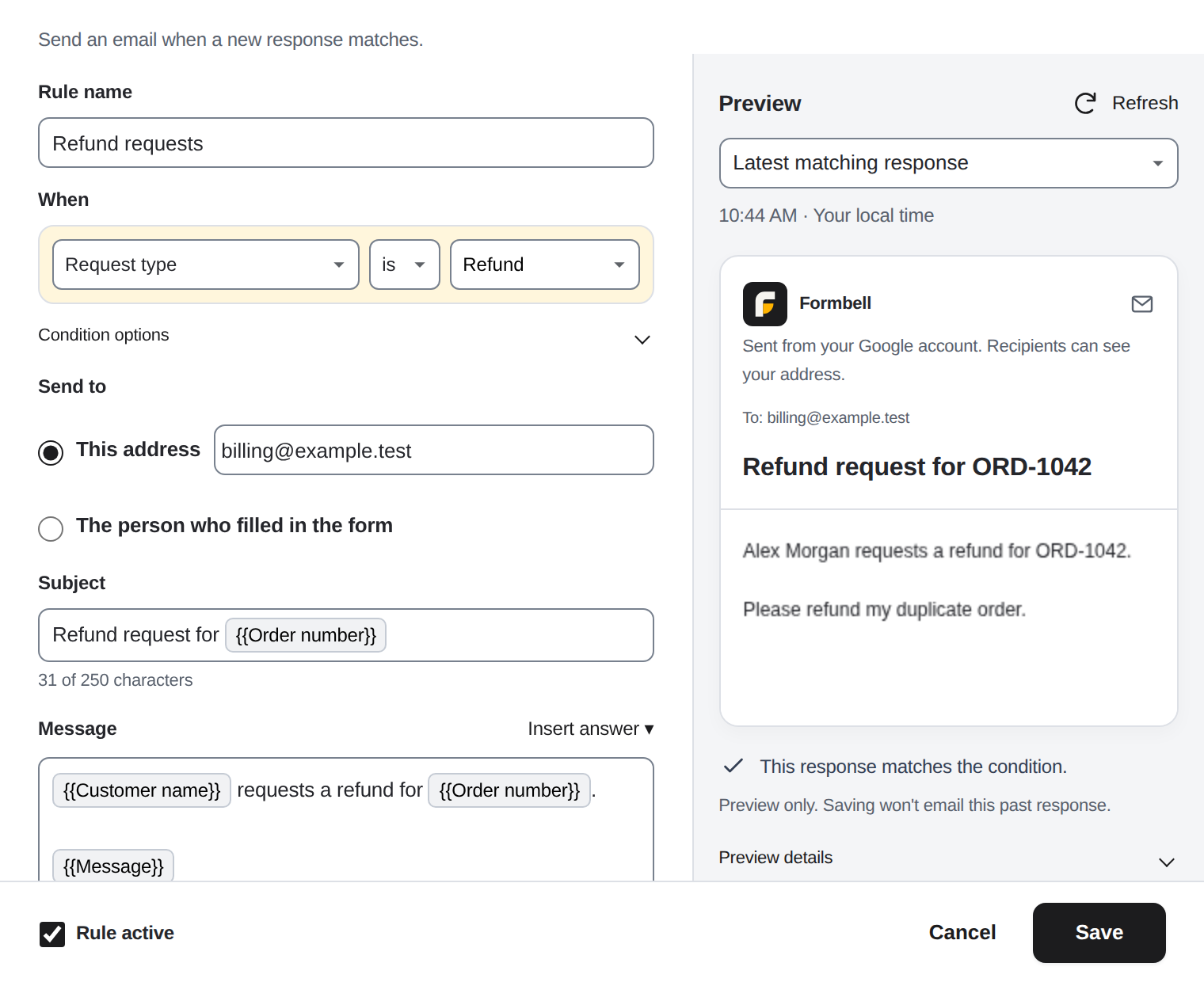
You write rules like "if Request type is Sales, email the sales team." Each rule uses one question and one condition: is, contains, is not empty or is any of. You send to a fixed address, or to an email address from the response.
You can put answers into the subject and the message, and use basic HTML. You can preview the email with a recent response, and send yourself a test.
In the send log you see Sent, Failed (with a reason when one is available), Unknown or Processing for recorded attempts. Sent means Google accepted the email for sending. You can't tell from Sent whether it reached the inbox.
You can review and resend eligible failed or unknown entries, and resends are labeled. You also see Google's remaining recipient count and how many recipients Answerfinch requested today.
Pricing
Free
$0
1 rule at a time across your Google account, with every condition type. No Answerfinch daily or monthly send cap; Google's sending limits apply.
Pro
$4 a month or $29 a year
Taxes included. Run more rules across every form in your Google account, within Google's sending and execution limits and Answerfinch's storage limits.
You see the price and the free limit inside the add-on before you pay. Dodo Payments handles Pro purchases as merchant of record. To cancel, send one email to runredteam@gmail.com or use the Dodo Payments customer portal. Cancelling stops future renewals. The Terms explain the UK cooling-off right and other refund requests.
Guides
- How to choose an email add-on for Google Forms
- Three ways to email people based on form answers
- Send email notifications based on Google Forms answers
- Send a personalized confirmation email
- Confirm parent-teacher conference sign-ups
Your data
Form responses are processed in Google Apps Script under your Google account, and are not sent to Lazy Labs servers. Rule emails go to the recipients you choose, and test emails go only to you. Operational diagnostics in Google logs may be visible to Lazy Labs, as the Privacy Policy explains.
Rules and the send log are stored with your form. Each form keeps its latest 200 log entries, and you can view or resend entries from the last 30 days, whichever limit comes first. Expired entries are deleted the next time Answerfinch runs. You can delete a form's Answerfinch rules and log from that form.
To check a Pro license, Answerfinch sends the license key and activation information to Dodo Payments. It never sends response content or recipient addresses.
Limits
Google limits how many emails a script can send each day. You can send within those limits; sending isn't unlimited.
Responses picked up more than 48 hours after they were submitted aren't sent automatically. You may still be able to resend eligible entries by hand while they are in the log.